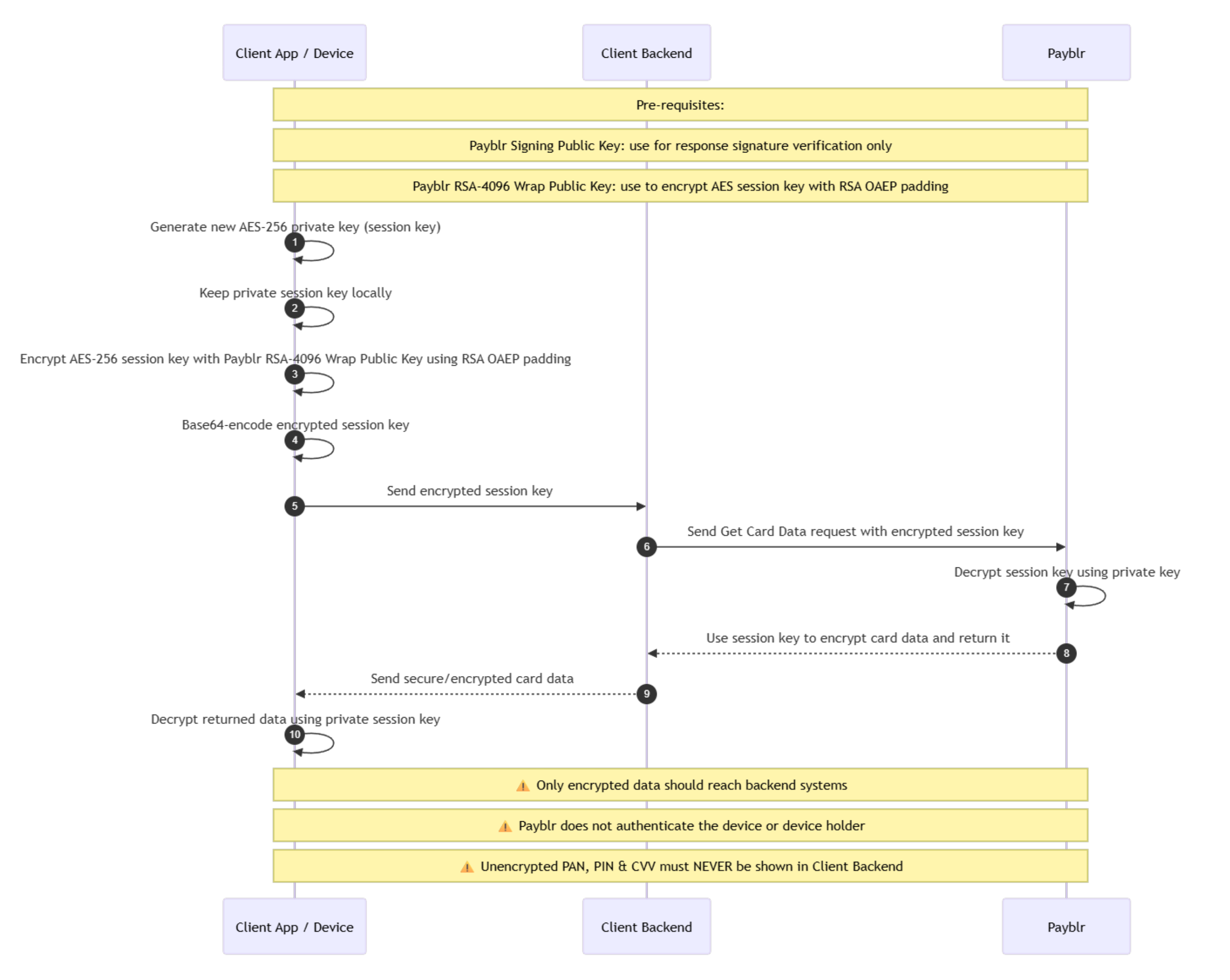
Secure Card Data

Secure Card Data

Payblr supports a secure-data flow for delivering sensitive card information to the cardholder’s device using encrypted payloads. In this implementation, this flow is used when your system needs to deliver actual secure card data, such as PAN, CVV, and PIN, through a protected end-to-end process.

Implementation note

In this implementation, Get Card Data is the secure-data flow used to deliver actual sensitive card data, including CVV and PIN where enabled. The separate CVV and PIN pages cover status checks and unblock operations only.

How it works

Payblr supports secure-data operations using two RSA keys:

Signature RSA key
Used only to verify the response signature. It is not used for encryption.

Payblr RSA public key
Used to encrypt the AES session key that protects the secure data exchange.

Secure-data requests use the following encryption model:

  1. The client application or device generates a new AES-256 session key for the request.

  2. That session key must be unique per request and kept securely on the client side.

  3. The client encrypts the AES session key using the Payblr RSA public key.

  4. The encrypted AES key is Base64-encoded and sent to your backend system.

  5. Your backend system then sends the encrypted key as part of the get Card Data Request.

  6. Payblr decrypts the session key.

  7. Payblr returns the requested data in encrypted form by using your session key.

  8. The client application or device uses the original AES session key to verify and decrypt the response.

How to implement

  1. Generate a new AES-256 session key on the cardholder device or secure client application.

  2. Encrypt the AES session key using the Payblr RSA public key.

  3. Base64-encode the encrypted AES key and include it in the request body as the required key field.

  4. Send a POST request to /api/v1/cards/{publicToken}/encrypted, including the target card’s publicToken in the path.

  5. Add optional cryptographic parameters only when needed:

    • paddingMode

    • encryptionKeyLength

    • hashingAlgorithm

  6. Receive the encrypted response, which includes:

    • iv

    • encryptedPayload

    • signatureOfPayloadAndIv

  7. Verify the response signature by validating the concatenated encrypted payload + IV with the appropriate signature verification key.

  8. Decrypt encryptedPayload using the original AES session key and the returned iv.

Request Fields

Important security considerations

This secure-data flow protects sensitive data in transit, but it does not by itself authenticate the device or verify the identity of the device holder. For that reason, Payblr strongly recommends that clients implement their own policy-based controls, such as device trust checks, user authentication, and other authorization safeguards before allowing secure-data access.

PCI DSS responsibility

If your organization is not PCI DSS certified, all key generation, encryption, and decryption must happen on the device.

Only encrypted data should ever be sent to backend systems. In other words, backend services should never receive or process clear sensitive card data in this model.

Important notes

  • Do not use the signature RSA key for encryption. It is only intended for verification.

  • Use a new session key for every request. Reusing keys weakens the security model.

  • Keep the session key only in the device to decrypt the response.

  • Ensure only the encrypted session key is transmitted as part of the request body.

  • Ensure backend services only handle encrypted payloads when operating outside PCI DSS scope.

Summary

In Payblr’s secure-data model, the client device generates a one-time AES-256 session key, encrypts that key with the Payblr RSA public key, sends the encrypted key with the request, and then uses the session key to decrypt the secure response. This design helps reduce exposure of sensitive card data, especially when implemented so that only encrypted data reaches backend systems.